

Estimated reading time: 7 minutes
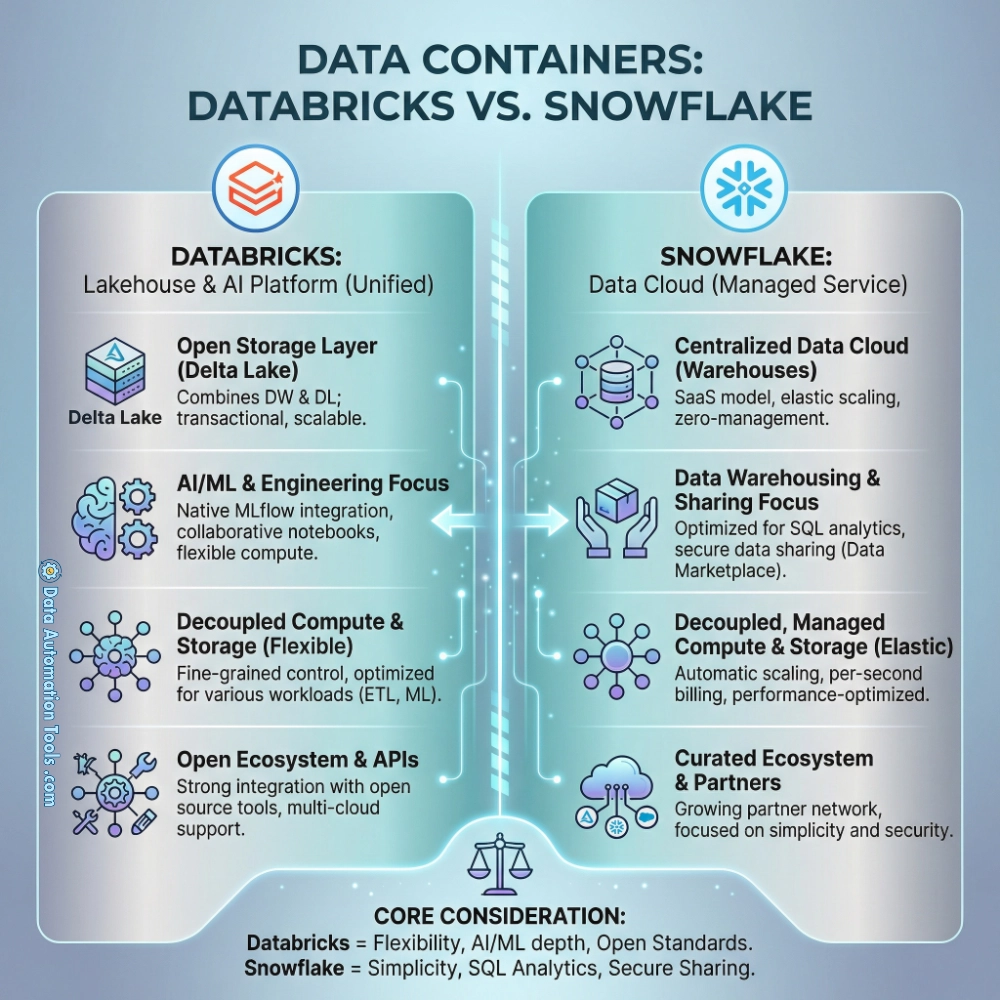
Databricks vs Snowflake. For over a decade, since the cloud brought bricks and flakes, data stacks have been reorganized around two different centers of mass. Snowflake and Databricks both promise that your data can be centralized, governed, and made useful to many teams at once—but they grew up solving different problems, and that difference still shows up in what they are, how they behave, and what tradeoffs they impose.
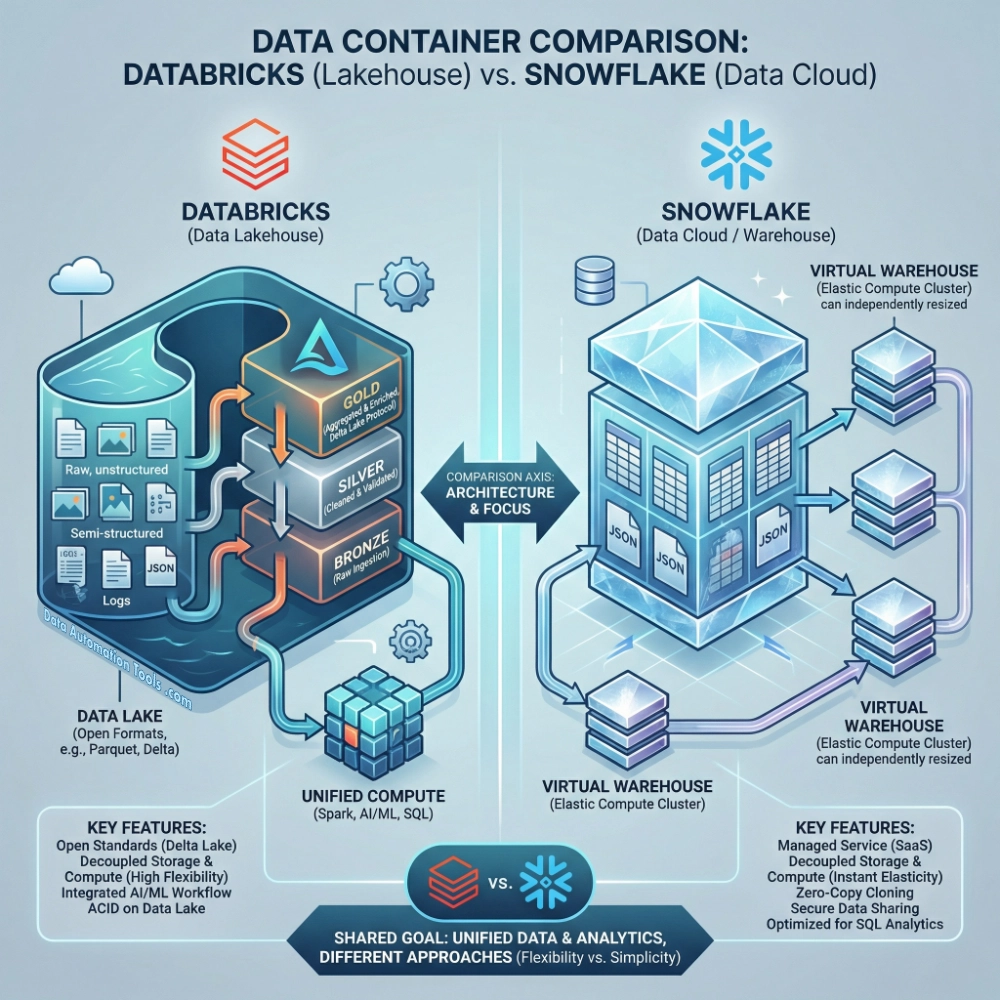
Snowflake is, in the plainest terms, a cloud data warehouse: a managed system built to store data and run SQL queries over it with high concurrency. Snowflake describes its compute as virtual warehouses, clusters of compute resources used to execute queries and other operations, and it emphasizes the separability of those warehouses from persistent storage. In practice, the “Snowflake way” is to treat the warehouse as the central place where analytics tables live, where SQL transformations run, and where BI workloads can scale without fighting for resources. A good Snowflake deployment feels like a database that rarely demands drama: you size compute, you suspend it when idle, and you expect many users to query at once.
Databricks, by contrast, is a lakehouse platform built on Apache Spark, organized around the idea that the same underlying data (often in object storage you control) should serve data engineering, streaming, analytics, and machine learning without fragmenting into separate systems. Databricks’ own “lakehouse” framing explicitly describes combining elements of data lakes and data warehouses, and it names Delta Lake and Unity Catalog as key technologies in that approach. Where Snowflake begins with the warehouse and broadens outward, Databricks begins with the lake-and-compute pattern and hardens it into something warehouse-like.
Which Comes First: Storage or Compute?
Both Databricks and Snowflake talk about separating storage and compute, but their defaults—and the operational posture those defaults encourage—diverge.
Snowflake’s compute abstraction is the virtual warehouse: you provision a warehouse of some size, it runs your SQL (and other supported workloads), and it consumes credits while it is running. Snowflake’s docs are explicit that warehouses are billed only while running, with per-second billing and a 60-second minimum each time a warehouse starts, and that warehouses are required not only for queries but also for loading data and DML. That makes Snowflake’s cost and performance feel like a dial you turn at the warehouse boundary: right-size, auto-suspend, isolate workloads, repeat.
Databricks begins from Spark’s model: compute clusters run against data in storage, typically cloud object storage. In the lakehouse description, Databricks explicitly anchors itself in Apache Spark and then layers Delta Lake (for ACID transactions and table reliability) and Unity Catalog (for governance across data and AI assets). The effect is that Databricks encourages you to think in terms of data pipelines and distributed compute first—then to make that environment serve SQL analytics as well, including through a specialized query engine such as Photon, which Databricks documents as a vectorized engine intended to accelerate SQL workloads and DataFrame API calls.
Long story short: Databricks’ model is pipelines-and-compute-first, with SQL as one of many equals. Snowflake’s is SQL-first, with anything else as an extension. Even shorter story: Databricks vs Snowflake is “Compute-first” vs “SQL-first”.
Bare-Knuckle Table Format Title Fight: Managed vs Tables
One of the most concrete lines between these worlds is the question of table formats and where the “truth” of a table lives.
Databricks positions Delta Lake as the foundation for tables in a lakehouse, describing it as open source software that extends Parquet files with a transaction log to support ACID transactions and scalable metadata handling. That matters because the table’s representation lives in files plus a log—artifacts that are intended to remain accessible beyond any single query engine.
Snowflake historically oriented around Snowflake-managed tables inside its environment, but Snowflake’s support for Apache Iceberg changes the options. Snowflake’s documentation describes Iceberg tables as combining Snowflake’s query semantics and performance with external cloud storage that you manage, and it frames them as well-suited to existing data lakes you cannot or choose not to store “in Snowflake.” Practically, this gives teams a way to keep data in an open table format in external storage while still querying it through Snowflake’s engine.
So the distinction is no longer “open vs closed” in the simplistic sense. Instead, it becomes: which system is the primary home for your tables by default, and how much do you rely on open formats as the canonical representation? Databricks makes the open table format central; Snowflake now supports it as an important option, but one that still lives alongside its more traditional managed-table posture.
Databricks vs Snowflake: Differences of Governance
Both Databricks and Snowflake have spent heavily on governance, but again, their center of gravity is revealing. Databricks’ Unity Catalog is a unified governance solution for data and AI assets, and its documentation foregrounds the idea of governing data across the workspace. That fits the Databricks worldview: you are running many kinds of workloads—data engineering jobs, notebooks, ML pipelines, and SQL—so governance needs to span more than one style of work.
Snowflake’s governance posture is inseparable from its database roots: access control, object privileges, and the familiar database pattern of “secure the data where it lives and where it is queried.” Snowflake also places unusual emphasis on workload isolation at the compute layer: separate warehouses, separate budgets, separate blast radiuses. It’s governance by strong boundaries, including economic ones.
Workloads: Databricks vs Snowflake
If you put both products in front of a mixed team—data engineers, analytics engineers, BI developers, and data scientists—the “native” feeling tends to differ by persona, because the products were shaped by different daily rituals.
Snowflake feels native when your center of work is SQL: analytics engineering, dimensional modeling, metric tables, BI concurrency, and operational reliability for many simultaneous users. Snowflake’s documentation also makes clear that virtual warehouses are the execution unit for SQL and DML, which reinforces that “warehouse = compute boundary” is the main lever teams pull.
Databricks feels native when your center of work is distributed computation beyond SQL: Spark jobs, notebook-driven exploration, large-scale transformations, and ML workflows that want to live close to the data in object storage. Databricks positions Photon as accelerating SQL and Spark-style workloads, which is consistent with treating SQL as a first-class workload, but not the only one.
Snowflake has expanded into developer runtimes through Snowpark—Snowflake describes Snowpark as libraries and execution environments for running Python and other languages with its engine, and its docs also note that warehouses can be used to run code via Snowpark. That is an important bridge: it means Snowflake can host more than SQL. But Snowpark does not invert Snowflake’s identity; it extends it. The platform still behaves like a warehouse first, with additional execution surfaces built to reduce data movement.
Databricks vs Snowflake Pricing
Snowflake’s pricing mechanics are tightly coupled to the warehouse abstraction: compute consumption is metered in credits, billed per-second with a 60-second minimum at start, and warehouses consume credits while running. You can often point to a specific warehouse and say, “That’s where the money went,” which makes cost control a governance and operations exercise: auto-suspend, right-size, isolate, monitor.
Databricks pricing is commonly framed around DBUs (Databricks Units), with Databricks’ pricing materials describing consumption as driven by workload processing metrics, and cloud-provider pricing pages (for example, Azure Databricks) describing DBUs as a unit of processing capability billed on a per-second basis, with consumption depending on instance size and type. The cost psychology here differs because Databricks often couples platform consumption (DBUs) with the underlying cloud infrastructure costs, and because compute shows up as clusters serving many kinds of workloads. In Snowflake, cost conversations often start at “which warehouses ran?” In Databricks, they often start at “which clusters, which workloads, and what mix of platform vs infrastructure?”
How to Choose Without Falling for Slogans
If you skin them of the marketing fluff and fog, a practical comparison emerges out of the Databricks vs Snowflake debate. Snowflake is a database-centric system designed to make analytics workloads (especially SQL-based workloads with high concurrency) predictable and operationally manageable, with a clean separation between storage and multiple isolated compute clusters. Databricks is a Spark-centric platform designed to unify data engineering, analytics, and ML on top of lake storage, with Delta Lake providing table reliability and Unity Catalog aiming to govern the estate across workloads.
In many organizations, the choice is as ideological as it is architectural: where you want your “center” to be. If the center is governed SQL analytics at scale, Snowflake’s warehouse model is a natural fit. If the center is a lake-oriented architecture that must serve heavy engineering and ML alongside analytics, Databricks’ lakehouse model aligns with that reality. Of course, both platforms continiue to appropriate each other’s best ideas—Snowflake supporting Iceberg, Databricks investing in warehouse-like SQL performance—in an attempt to appeal to a larger and larger market share. But underneath that icing is the cake: the differentiator remains which platform’s default worldview matches how your organization’s.